
Getting Started with Conquer the Galaxy
Learn the invasion loop, protect your producers, and clear your first maps with confidence.
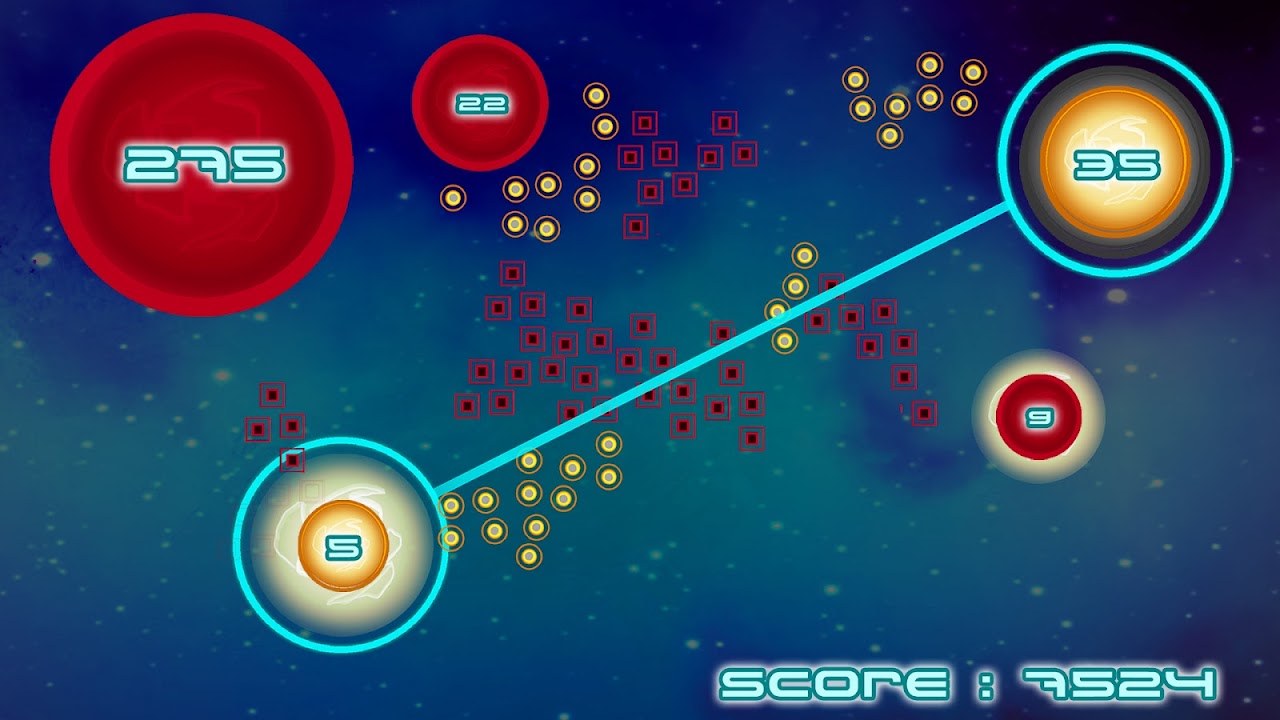
Conquer the Galaxy is a free tactical browser game from PLAYTOUCH. You command coloured planets that slowly generate units. Click (or tap) a planet you own, choose how many troops to send, then target a neutral or enemy world. If your fleet arrives stronger than the garrison, the planet flips to your colour and starts producing for you. That single loop powers every level, so mastering it early saves dozens of retries.
This beginner guide assumes a fresh install on Playzool or the Android package net.playtouch.conquerthegalaxy. For button-by-button input help, keep the controls page open beside you.
Your first five minutes
Launch the game and pick Time Attack for the tutorial feel — the timer teaches urgency without the full pressure of Versus. Identify your starting planets by colour. Watch the unit counters rise. Larger planets usually fill faster, which makes them your economic core.
Do not empty a core planet on the first click. Send roughly half to a nearby weak target, then wait for the counter to rebuild. When the first capture lands, immediately use that new world as a forward base instead of ferrying everything from home. Short travel paths win more fights because fleets arrive before the enemy can reinforce.
How invasions resolve
When two fleets meet, numbers decide the outcome. Extra units are wasted if you overkill by a huge margin, yet under-sending by one unit loses the planet and the entire expedition. A practical habit is to estimate the defender count, add a small buffer for production that continues while your ships travel, then send. The tools page lists a simple mental checklist for this math.
Neutral planets often start with modest garrisons. Enemy AI planets grow while you hesitate, so delayed attacks get more expensive. If two targets look equal, take the one closer to your production cluster first.
Defence is part of offence
Beginners tunnel on capturing and forget that every empty planet is free real estate for a counter-attack. Leave a visible garrison on border worlds. In Versus mode this matters even more; see the dedicated Versus guide once you finish this page.
If a planet is about to fall and you cannot reinforce in time, evacuate remaining units to a safer world rather than watching them vanish. Those rescued troops can retake the lost planet moments later when the invader is spent.
Growth priorities
Think in tiers. Tier one: secure high-output planets near spawn. Tier two: cut enemy production by sniping their largest worlds. Tier three: mop up leftovers. The strategy rank page expands this into ranked opening choices. For broader tactics such as split attacks and feints, read strategy tips.
Common early mistakes
Sending 100% of a planet’s units leaves it at zero and invites instant flips. Chasing distant planets while ignoring a neighbour that can strike your capital wastes travel time. Panic-clicking without holding to set a precise troop percentage burns surplus you needed for the next fight. Double-check controls if hold-to-select feels inconsistent on your device.
Another frequent error is treating Time Attack like a deathmatch. You do not need perfect efficiency on map one — you need a clean clear. Use early levels to practise the half-send habit and short-path captures. When the timer feels comfortable, move to the Time Attack guide for record-oriented routes.
Session checklist
- Confirm you are on an official free portal listed under where to play.
- Warm up with one easy Time Attack map.
- Capture with half-sends from your best producer.
- Keep border garrisons above zero.
- Review the level walkthrough if a layout stalls you.
- Bookmark strategy rank for opening decisions.
After your first full clear
Celebrate the win, then immediately replay the same map with a tighter route. Compare how many seconds you spent waiting versus travelling. Waiting for production is often correct; travelling across the whole galaxy for a low-value planet rarely is. When you can clear early maps without panic, graduate to Versus and use the invasion tools checklist before each major push.
Conquer the Galaxy rewards calm arithmetic more than flashy clicks. Build that habit now and every later guide on this wiki will click into place. For studio links and platform facts, see updates and the links hub.
Frequently Asked Questions
Quick answers to the most common questions.
Is Conquer the Galaxy free for beginners?
Yes. You can play in the browser or on Android without paying. See Free Play and Where to Play.
How many units should I send on my first attack?
Estimate the defender count, add a small travel buffer, and keep a garrison at home. Details are in Tools and Strategy tips.
Should I start in Time Attack or Versus?
Start in Time Attack to learn timing, then switch to Versus. Mode pages: Time Attack and Versus mode.